

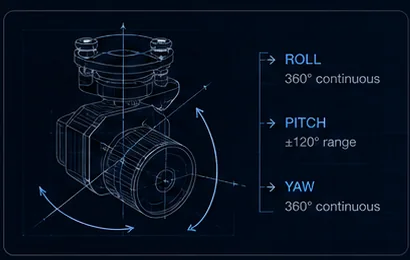
Three complaints cover most gimbal support tickets: the camera slowly yaws on its own, the horizon sits tilted, or video drops intermittently. Each has a short diagnosis path, and most cases resolve without a repair shop.
- 3Complaints covering most tickets
- InitWhere drift usually starts
- PhysicalWhat dropouts usually are
- BenchWhere to diagnose
Key takeaways
- Slow steady yaw drift usually traces to gyro bias — picking the aircraft up mid-initialisation bakes in an offset.
- For horizon tilt, separate mount from gimbal first: constant tilt is mechanical, varying tilt is calibration.
- Intermittent video is nearly always physical. Flex the harness near each connector while watching the feed.
- Grinding, resistance to smooth hand movement when unpowered, or impact damage means stop flying and contact support.
On this page
Yaw Drift
Slow, steady drift usually traces to gyro bias. Power the aircraft on a still, level surface and let the payload finish initialisation before moving anything — picking the aircraft up mid-init bakes in an offset that the gimbal will then carry for the whole flight.
This single habit resolves a large share of drift complaints, and it is easy to violate because initialisation is undramatic and people are in a hurry. Watch the initialisation sweep complete, then move.
Persistent drift after clean starts calls for the gimbal calibration routine. That is a legitimate use of recalibration — a symptom exists and you are treating it, rather than recalibrating preventively, which the maintenance guide advises against.
Drift only under load points elsewhere entirely. Check for transmitter trim or a controller channel feeding constant input — a stick that is not quite centred, or a channel mapped to an axis and sitting slightly off neutral, produces exactly this signature. Control interfaces compared covers channel mapping.
Horizon Tilt
First separate mount from gimbal, because the fix is completely different in each case and the symptom looks identical.
If the tilt angle is constant in all directions, the mounting plate or damping balls are seated unevenly. Inspect for a collapsed damper — elastomer dampers age, and one that has taken a set holds the payload at an angle no calibration will correct. Vibration and damping design covers why they degrade.
If tilt varies with manoeuvres, run the IMU and accelerometer calibration on a verified level surface. “Verified level” is doing work in that sentence — a calibration performed on a surface you assumed was level bakes the assumption into the payload.
If the horizon is level on the bench but tilts in forward flight, that is aerodynamic load on a worn damper set. The airflow is pushing the payload against dampers that no longer resist it, which is a mechanical finding rather than a calibration one.
| Symptom | Likely cause | Action |
|---|---|---|
| Constant tilt in all directions | Uneven mount or collapsed damper | Inspect and replace dampers |
| Tilt varies with manoeuvres | IMU or accelerometer calibration | Recalibrate on a verified level surface |
| Level on bench, tilts in forward flight | Aerodynamic load on worn dampers | Replace damper set |
| Tilt appears gradually over weeks | Damper degradation or mount shift | Bench-check after each transport leg |
Video Dropouts
Intermittent video is nearly always physical. Flex the harness gently near each connector while watching the feed — a flicker localises the fault to within a few centimetres, and this takes about a minute.
Shared power rails are the second suspect, especially when dropouts coincide with IR illuminators or transmitters keying up. A rail that sags when a step load arrives takes the video system down with it, and the symptom looks like a video fault while the cause is electrical — the power budget guide covers the fix, which is usually a dedicated fused feed rather than an accessory rail.
Firmware mismatch between camera and link is the third. This one is worth checking early if the dropouts began after an update rather than after a hard landing — payload firmware architecture covers versioning and why pinning a version across the fleet is worth the discipline.
The diagnostic order matters: physical, then electrical, then firmware. Each is faster to test than the next, and the probability runs in the same direction.
A Field Diagnosis Order
Working through this sequence resolves most cases before anyone contacts support.
- Reproduce the symptom on the bench with the payload powered and the aircraft still.
- Confirm initialisation completes cleanly on a level surface without the aircraft being moved.
- Hand-tilt test: does the horizon hold level, and is any tilt constant or varying?
- Flex the harness near each connector while watching video.
- Check whether the symptom correlates with a step load — illuminator, transmitter, hard yaw.
- Check firmware versions across camera, gimbal and link, and whether the symptom postdates an update.
Record what you find at each step. A support conversation that begins with “constant tilt, unchanged after recalibration, appeared after transport” gets to a resolution far faster than one that begins with “the gimbal is broken” — and half the time writing it down identifies the cause.
Bench first, always. Diagnosing at altitude costs a flight and produces worse information. Every one of these symptoms reproduces on the ground.
When to Stop Flying
Three findings mean stop, and none of them should be flown through in the hope they resolve.
Grinding sounds from any axis. That is mechanical contact where there should not be any, and continued operation turns a repairable fault into a replacement.
An axis that resists smooth hand movement when unpowered. A healthy gimbal axis moves freely with light pressure; resistance means a bearing, a cable or a mechanical obstruction, and forcing it makes it worse — see maintenance on why axes should never be forced.
Visible impact damage. Even where everything still functions, an impact can shift the boresight alignment between channels, which silently invalidates dual-channel work — boresight alignment covers what depends on it.
In all three cases, contact support with a video of the symptom. A ten-second clip of the behaviour is worth more than several paragraphs of description and usually shortens the diagnosis considerably.
Related reading
- Vibration and Damping Design
- IMU, AHRS and Attitude Fusion
- Payload Firmware Architecture
- EO/IR Sensor Fusion and Boresight Alignment
- Gimbal Camera Maintenance
- UAV Payload Power Budgets
- The Thermal Payload Pre-Flight Checklist
- What ±0.01° Gimbal Accuracy Means at 1,000 Metres
- AX-200T — 3-axis gimbal
- OP-90A — multi-sensor pod
- MV-2P — 640×512 thermal at 130 g
- Telecom Tower Drone Inspection
FAQ
When is it actually a repair case?
Grinding sounds, an axis that resists smooth hand movement when unpowered, or visible impact damage. Stop flying and contact support with a video of the symptom — a ten-second clip shortens diagnosis more than any written description. Impact damage deserves particular caution even when everything still works, because it can shift boresight alignment between channels and silently invalidate dual-channel workflows.
Should I update firmware to fix a mechanical symptom?
No. Firmware does not repair collapsed dampers, worn bearings or uneven mounting, and updating introduces a change that makes the original fault harder to isolate. Diagnose mechanically first — constant tilt, resistance in an axis and grinding are all physical findings. Firmware is a legitimate suspect only when the symptom is intermittent video or control behaviour that postdates an update.
Why does drift only appear under load?
Because that pattern usually is not gyro bias at all. Drift that appears only when you are commanding the gimbal points to a control input rather than a sensor problem — most often a transmitter trim slightly off centre, or a channel mapped to an axis and resting just off neutral. Check the transmitter before recalibrating anything, since a calibration will not fix a stick that is not centred.
Questions about the technology? Talk to our engineers — we reply within 2 business days.