
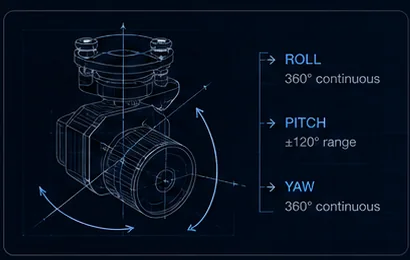
A head-tracking FPV gimbal slaves camera pointing to your goggles: look left, the camera pans left. Combined with a stabilised 3-axis mount, it turns a fixed cockpit view into a scannable one — useful far beyond cinematic flying, from close inspection to spotting from a moving platform.
- 46 gAX-20T three-axis mount
- ±0.05°Published angular accuracy
- 3 linksO4, O3, Walksnail supported
- 0 msAdded video latency
Key takeaways
- Goggles output pan and tilt angles to the radio link, which forwards channel values to the gimbal over S.BUS, PWM or serial.
- The gimbal blends head commands with its own stabilisation, so the horizon stays level while the view follows your head.
- Camera compatibility comes first — mounts in this class are built around specific camera families.
- Head tracking rides the control link, not the video link, so it adds no video latency.
On this page
The Control Chain
Goggles or a separate head-tracker output pan and tilt angles derived from your head position. Those become channel values on the radio link, which forwards them to the gimbal over S.BUS, PWM or serial — the same interfaces covered in the gimbal control guide.
The gimbal then does something more sophisticated than simply obeying. It blends head commands with its own stabilisation, so the horizon stays level while the view follows your head. Without that blending you would get a camera that tilts with the aircraft as well as with your neck, which is unwatchable.
This is why head tracking on a stabilised three-axis mount feels natural and head tracking on an unstabilised servo mount does not. The stabilisation is rejecting airframe motion continuously while the head commands ride on top as an offset — 1-axis vs 2-axis vs 3-axis covers why the third axis matters here.
What to Check Before Building
Three checks in order, because the first one can invalidate the other two.
Camera compatibility first. Mounts in this class are built around specific camera families rather than being universal. The AX-20T three-axis FPV gimbal at 46 g supports DJI O4, DJI O3, Walksnail and standard 19 mm camera builds, with MAVLink support for flight-controller integration. Confirm your exact camera before anything else — matching a gimbal camera to your FPV link covers why variants are not interchangeable.
Then weight. On small quads every gram of gimbal trades directly against battery, and the relationship is worse than linear — payload weight versus flight time covers the arithmetic. The AX-20 family spans 17 g single-axis to 46 g three-axis, and that 29 g is a real decision on a light build.
Finally, angle ranges and geometry. Check the controllable range covers the scanning you intend, and whether the gimbal supports the non-orthogonal geometry that keeps propellers out of frame. A mount that can point where you look and shows you your own props at the extremes has solved half the problem.
| Gimbal | Axes | Weight | Controllable range | Power (static / stall) |
|---|---|---|---|---|
| AX-20T | 3-axis | 46 g | Pitch −105° to +145°, roll ±60°, yaw ±160° | 1.5 W / 14 W |
| AX-20D | — | 30 g | See product page | — |
| AX-20S | 1-axis | 20 g with damper | Pitch ±120° | 1.0 W / 5.5 W |
Vertical vs Horizontal Mounting
Vertical variants — the AX-20D family’s Vertical models — suit airframes where the camera hangs nose-down. This is a frame geometry question rather than a preference, and it is worth resolving at purchase.
Pick the orientation matching your frame rather than adapting with brackets. An adapter bracket adds mass, adds a resonance path between the airframe and a precision instrument, and moves the payload’s centre of mass away from where the damping was designed to carry it — payload mechanical integration covers why that matters more than it looks.
The vertical variants exist across the link ecosystems too — O4 Pro, O4, O3, Avatar/Moonlight and analog — so choosing vertical does not narrow your link options. It does mean the variant matrix has two dimensions, and ordering requires specifying both.
Beyond Cinematic Flying
Head tracking reads as a cinematic feature and is genuinely useful for work. Three cases stand out.
Close inspection. Scanning a structure while holding position is far more natural with head movement than with stick inputs, because looking is a thing humans do without conscious effort and thumb-driving a gimbal is not.
Spotting from a moving platform. When the aircraft is transiting and the operator needs to keep eyes on something off-axis, head tracking decouples looking from flying in the most intuitive way available.
Situational awareness in confined spaces. A fixed forward camera in a tight environment is a tunnel; a scannable one lets the pilot check clearances they would otherwise have to yaw the whole aircraft to see.
Head tracking is a control method, not a capability. It changes how the camera is pointed, not what the camera can see. Sensor choice, stabilisation quality and link latency all still decide what the mission can achieve.
Related reading
- Gimbal Stabilization Technology
- Payload Mechanical Integration
- Gimbal Control Interfaces Compared
- Matching a Gimbal Camera to Your FPV Link
- 1-Axis vs 2-Axis vs 3-Axis Gimbals
- Video Latency in UAV Payload Systems
- Payload Weight vs Flight Time
- Drone Gimbal Camera Types
- AX-20T — 46 g three-axis FPV gimbal
- AX-20D — 30 g gimbal
- AX-20S — 17 g single-axis gimbal
- AX-20T O4 Pro variant
FAQ
Does head tracking add video latency?
No — tracking rides the control link, not the video link. Your head movement travels up as channel values and the gimbal responds; the video coming back is unaffected by that path. Video latency depends entirely on the camera and link system, and is typically 20–40 ms on analog and 60–120 ms on digital HD. See our latency guide for the full budget by mission.
Can I use head tracking on RC cars or fixed-wing aircraft?
Yes in both cases, with caveats. The control chain is platform-agnostic — goggles to link to gimbal — so anything carrying a compatible mount and receiver can use it. On fixed-wing the caveat is the vibration spectrum, which differs from multirotors and needs its own damping tune; on ground vehicles it is usually mounting geometry and dust ingress rather than the tracking itself.
Which gimbal weight should I choose for a small quad?
The lightest that gives you the axes you need. The AX-20 family spans 20 g single-axis to 46 g three-axis, and on a small build that 26 g difference is a real trade against battery. Head tracking is most compelling on a three-axis mount, because yaw is what makes looking left actually work — so if head tracking is the point of the build, the weight is usually worth paying.
Questions about the technology? Talk to our engineers — we reply within 2 business days.